1、虚拟机磁盘镜像的定制
到 https://dl.rockylinux.org/pub/rocky/10/images/ 页面(国内也可以通过镜像站下载,例如:https://mirrors.qlu.edu.cn/rocky/10/images/),下载Rocky Linux 10的Cloud镜像,上传到PVE的/mnt目录中
下载Rocky Linux 10的磁盘镜像,并安装包含virt-customize命令的包
wget https://mirrors.qlu.edu.cn/rocky/10/images/x86_64/Rocky-10-GenericCloud-LVM.latest.x86_64.qcow2
apt-get update && apt-get install -y libguestfs-tools
virt-customize --version
查看磁盘镜像(磁盘大小)和镜像中分区相关信息
qemu-img info /mnt/Rocky-10-GenericCloud-LVM.latest.x86_64.qcow2 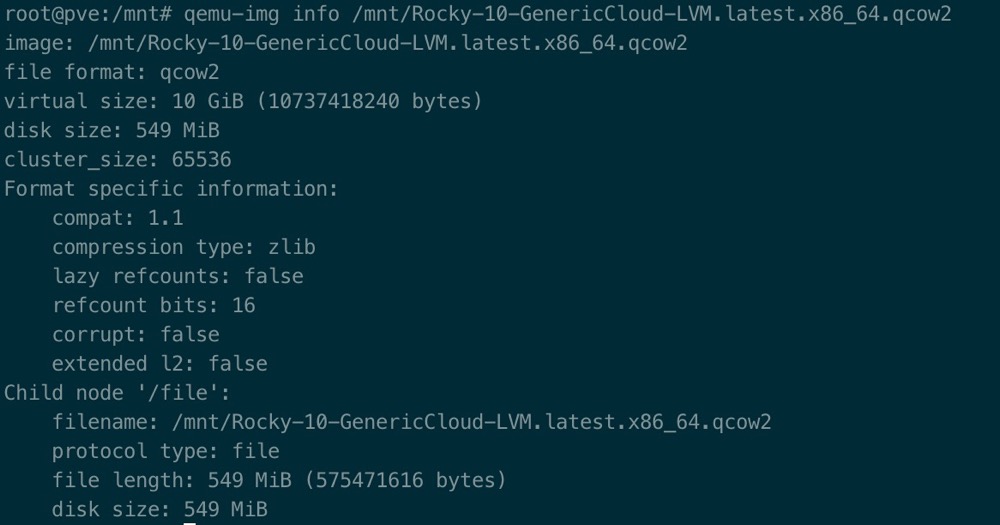
virt-filesystems --long -h --all -a /mnt/Rocky-10-GenericCloud-LVM.latest.x86_64.qcow2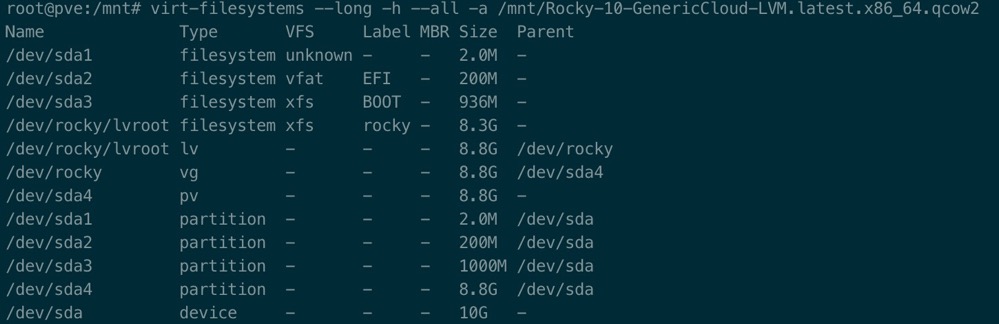
可以查看磁盘镜像中文件系统内容,首先创建qcow2磁盘镜像根文件系统的挂载目录,然后把qcow2磁盘镜像的/挂载到上面创建的目录
mkdir -pv /tmp/mnt
guestmount -a /mnt/Rocky-10-GenericCloud-LVM.latest.x86_64.qcow2 -m /dev/rocky/lvroot --rw /tmp/mnt/
guestunmount /tmp/mnt/
1.1、定制Rocky的镜像
定制化qcow2镜像中的文件系统,做系统初始化配置
virt-customize -a Rocky-10-GenericCloud-LVM.latest.x86_64.qcow2 \
--smp 2 --verbose \
--run-command 'sed -e "s|^mirrorlist=|#mirrorlist=|g" -e "s|^#baseurl=http://dl.rockylinux.org/\$contentdir|baseurl=https://mirrors.aliyun.com/rockylinux|g" -i.bak /etc/yum.repos.d/rocky*.repo' \
--install "epel-release" \
--run-command 'dnf clean all && dnf makecache' \
--install "sudo,vim,unzip,bash-completion,wget,curl,qemu-guest-agent,telnet,screen,htop" \
--run-command 'systemctl enable qemu-guest-agent' \
--run-command 'sed -i "s/#PermitRootLogin prohibit-password/PermitRootLogin yes/g" /etc/ssh/sshd_config' \
--selinux-relabel \
--run-command 'sed -i "s/^SELINUX=.*/SELINUX=disabled/g" /etc/selinux/config' \
--timezone "Asia/Shanghai" \
--root-password password:123456 \
--truncate "/etc/machine-id"
1.2、允许root用户通过密码进行ssh登录
通过virt-edit修改镜像中cloud-int的配置文件,开启ssh的密码登录,如果不配置此选项,cloud-int会创建/etc/ssh/sshd_config.d/50-cloud-init.conf文件,禁止密码登录
virt-edit -a /mnt/Rocky-10-GenericCloud-LVM.latest.x86_64.qcow2 /etc/cloud/cloud.cfg
ssh_pwauth: true
2、制作虚拟机模版
创建模版虚拟机,并挂载上面修改后的磁盘镜像作为虚拟机的磁盘
qm create 103 --name rocky-10-template --memory 4096 \
--cpu host --cores 2 \
--bios ovmf --efidisk0 local-lvm:1,format=raw,efitype=4m \
--scsihw virtio-scsi-single \
--scsi1 local-lvm:cloudinit \
--net0 virtio,bridge=vmbr0 \
--boot order=scsi0 \
--onboot 1 \
--agent 1 \
--serial0 socket \
--machine q35
qm importdisk 103 /mnt/Rocky-10-GenericCloud-LVM.latest.x86_64.qcow2 local-lvm --format qcow2
qm set 103 --scsi0 "local-lvm:vm-103-disk-1,discard=on,ssd=1"
qm set 103 --ipconfig0 ip=dhcp
可以通过如下两种方式从模版克隆虚拟机:
- Linked Clone:这种方式使用较少的磁盘空间,这种方式克隆的虚拟机依赖于模版,不能在缺少模版的情况下独立运行
Full Clone:这种方式使用和模版机相同大小的磁盘,其是原始模版机的完整拷贝,可以独立运行
qm clone 103 104 \
--name rocky-10-bastion \
--full 1 \
--storage local-lvm \
--format raw
qm set 104 --ipconfig0 ip=192.168.2.104/24,gw=192.168.2.1
qm start 104
qm set 104 --tags "192.168.2.104"
qm terminal 104